
MuK Product
muk_product
Centralize your product views
Every product list and setting, in one app.
Products, variants, pricelists, documents and their configuration under one icon on the home menu — and every new product gets its internal reference and EAN-13 barcode on its own.
Products, variants, price rules, documents, units and settings in one app, without installing Sales or Inventory.
A new product takes the next internal reference and a barcode with a valid EAN-13 check digit. Both can be switched off.
Paste a column of references, names or barcodes, preview the matches and open exactly those products.
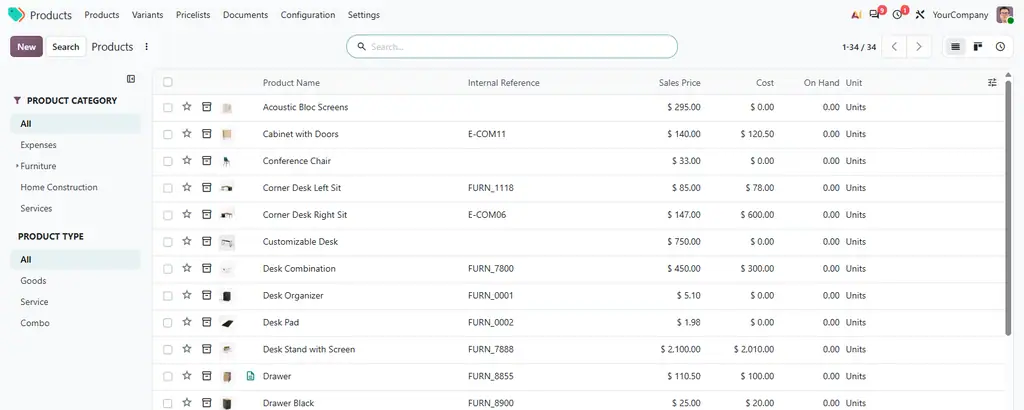
The product app Odoo leaves out
Odoo keeps products inside Sales, Purchase and Inventory. This module gives them an app of their own, one click from the home menu.
Products, variants, pricelists, documents, combo choices, units, packaging barcodes and base units.
Sequences fill in missing codes, barcodes carry an EAN-13 check digit and references stay unique.
Paste values split by line, space, comma, semicolon or tab and match them exactly or in part.
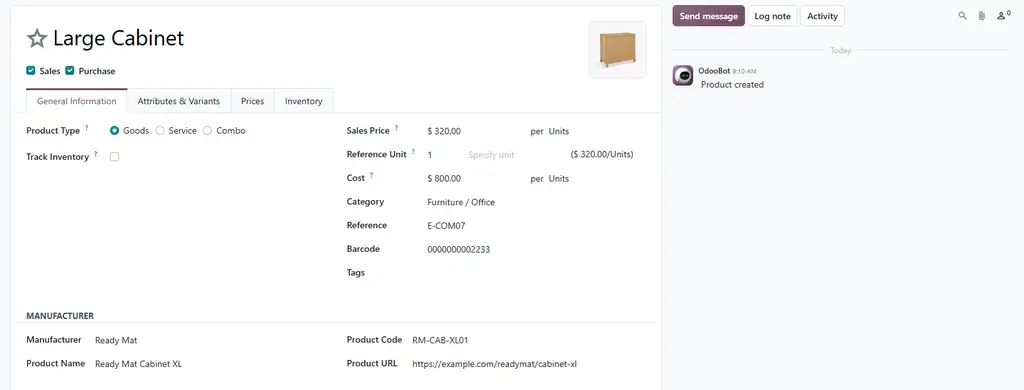
Manufacturer, product name, code and URL, and the code is found by every product search.
Filter products and variants by company, category, type, attribute and tag in one click.
The fixed prices of every pricelist and product, edited inline like a spreadsheet.
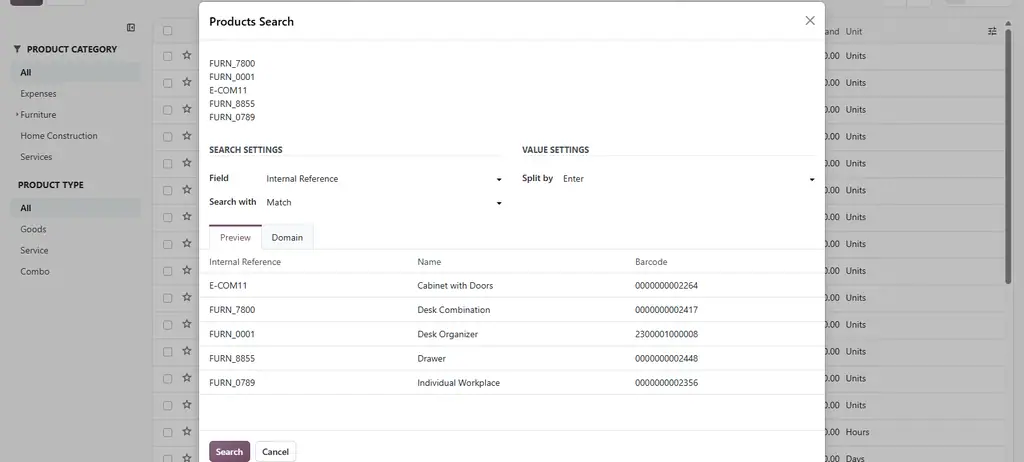
Paste a list, open those products
Copy a column from a spreadsheet, an order or an email and paste it. Search by internal reference, name or barcode, exactly or in part. The preview shows the first matches before the list opens.
Who makes it, under which code
Each product records its manufacturer and the manufacturer’s own name, code and URL. The code belongs to the variant, and typing it into any product search finds the product.
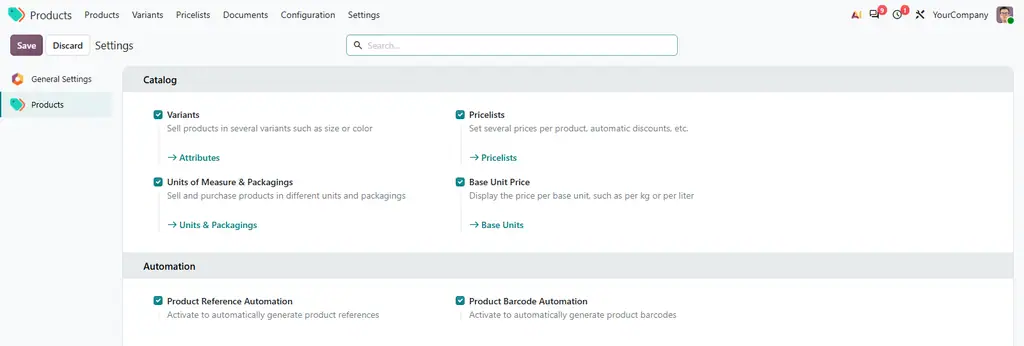
Switch features on from the app
The app has its own settings tab: variants, pricelists, units and packagings, base unit prices and the two automations. A link under each option opens its configuration.
Odoo shows these options only inside Sales, Purchase, Inventory or eCommerce. Here they come with the product app alone.
Help and support
What you get for free, and what has to be paid work.
Issues and merge requests are welcome on the public repository. They are read — but no response time is promised.
A numbering scheme built for your catalog, or a fix on a deadline, is paid work — quoted up front. Write to sale@mukit.at.
LGPL-3. Use it, change it, ship it inside your own work — no licence key, no database count.
Want more?
MuK IT — Austrian Odoo partner, ViennaModules written for your process, on your Odoo version.
Odoo joined up with the systems you already run.
Hosting, deployment and upgrades you do not have to watch.
Your team taught the parts of Odoo they actually use.
An agreement, so an answer does not depend on who is free.
Documentation
The full text is on the Documentation tab, and in doc/ inside the download.Odoo.sh or on-premise, Community or Enterprise.
Products › Settings, the Catalog and Automation blocks.
Depends on product and muk_web_utils, nothing external.
Open Products from the home menu. Search opens the bulk search.
From 19.0, fixed variant prices become the variant’s sales price.
MuK IT GmbH, Vienna. Author and maintainer.
References in your own format?
Send us the numbering scheme and the Odoo version, and we will tell you how far the sequences carry it. MuK IT — Austrian Odoo partner, Vienna.
Ce que l'application ne fait pas
L'éditeur n'a pas encore publié la liste de ce que l'application ne fait pas. C'est une règle du magasin : demandez-la au support avant de vous engager.
Applications du magasin nécessaires
- MuK Tree List
muk_web_tree - MuK Web Utils
muk_web_utils
Modules Odoo Community utilisés
product
| Série | Version | État | Publiée le |
|---|---|---|---|
| 20.0 | 20.0.1.6.2 | Disponible | 27/09/2026 |
Fiche générée depuis julien2364/omnifloo-tiers-muk-it-odoo-modules (branche 20.0, commit 5bd298c18a48).
Contrôle automatique du magasin (distinct de l'éditeur), appliqué à toutes les applications. Conforme.
| Contrôle | Résultat | Effet si absent |
|---|---|---|
| Manifeste lisible sans exécution | conforme | bloquant |
| Licence reconnue (LGPL-3) | conforme | bloquant |
| Aucune dépendance vers Odoo Enterprise | conforme | bloquant |
| Aucun import de code Enterprise | conforme | bloquant |
| Aucun en-tête de licence Enterprise | conforme | bloquant |
| Icône static/description/icon.png | conforme | déclasse |
| Description (static/description/index.html ou README) | conforme | déclasse |
| Tests automatisés (tests/test_*.py) | conforme | déclasse |
| Traduction française (i18n/fr.po) | conforme | info |
| Section « Ce que le module ne fait pas » | absent | info |
Avis des clients connectés. Un avis noté par client ; l'éditeur peut y répondre. Connectez-vous pour laisser un avis.
- Éditeur
- MuK IT GmbH
- Signaler un problème
- https://github.com/muk-it/odoo-modules
- Clients Omnifloo
- Support inclus selon votre formule : centre d'aide.