
Mass Editing
server_action_mass_edit
Mass Editing
Mass Editing
This module allows to edit several records at the same time in any Odoo model.
Table of contents
Use Cases / Context
Context
Difference in comparison to the Odoo Feature**
Since Odoo V13, a limited Mass Editing feature is available in Odoo CE.
In the list view, when selecting multiple records, you can edit a field. Then, the system will ask you if you want to apply those changes on all selected records.
This module provides the following extra features :
- Mass edit many fields in a single action
- Add an access group to the Mass Edit Action to limit the usage of this action to specific users.
- Filter the records the user can mass update
- Mass edit any fields with any widget. (For example color fields, image fields, etc…)
Use Case
It can be useful to be able to edit the value of one or more fields on multiple records at the same time easily.
For example, if I want to identify some contacts as Customers, I need to change the value of the field customer_rank from 0 to 1. This field is not visible on the form view of a Contact so the only way to do it (without this module) would be to export the list and import the edited file.
Another example would be to give access to specific users, using access groups, to mass edit some fields on the invoices.
Configuration
As a user from the access group Administration / Settings, in debug mode, go to Settings / Technical / Actions / Server Actions and create a new Server Action.
In the field Type, choose the new option Mass Edit Records.
Select the model on which you want to configure this action and give a name to your server action.
Add the fields you want to be able to edit.
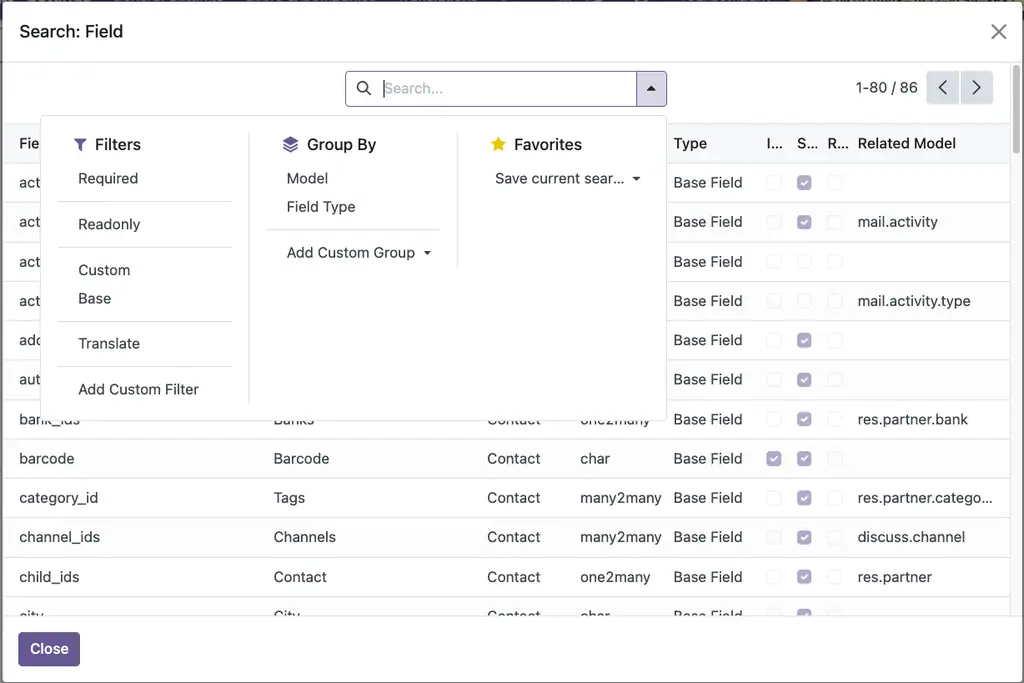
You can search and filter all the fields available by clicking on Search more.
Click on Create Contextual Action to add the Mass Editing action in the Action menu.
Widget Option
This option allows you to choose the widget to be used in the Mass Editing Action Window.
Apply Domain
This option allows you to apply the default Domain related to the selected field.
Adding a Message
You can add a “Message” to guide the users when using this action.
Adding security access group
Go to the field Allowed Groups and add the Access Group(s) who can use this action.
Now, only users from those groups will be able to see and use this action.
Usage
- Go for Mass Editing: select the records which you want to modify and click on Action to open mass editing popup.
- Select Set / Remove action and write down the value to set or remove the value for the given field.
- This way you can set / remove the values of the fields.
Known issues / Roadmap
- Auto add fields that are used in related domains if apply_domain=True
Changelog
V11 to V13 Access
The module was previously named mass_editing (from v6.1 to version 15) See : https://odoo-community.org/shop/mass-editing-1568?search=mass_editing#attr=5526
From version 16+, it is named server_action_mass_edit See: https://odoo-community.org/shop/mass-editing-11388?search=server_action_mass_edit#attr=22115
Access to the feature in V11 to V13
As a user from the access group Administration / Settings, go to Settings / Mass Operations / Mass Editing.
Bug Tracker
Bugs are tracked on GitHub Issues. In case of trouble, please check there if your issue has already been reported. If you spotted it first, help us to smash it by providing a detailed and welcomed feedback.
Do not contact contributors directly about support or help with technical issues.
Credits
Authors
- Serpent Consulting Services Pvt. Ltd.
- Tecnativa
- GRAP
- Iván Todorovich
Contributors
- Oihane Crucelaegui <oihanecrucelaegi@gmail.com>
- Serpent Consulting Services Pvt. Ltd. <support@serpentcs.com>
- Jay Vora <jay.vora@serpentcs.com>
- Juan Negrete <jnegrete@casasalce.com>
- Raul Martin <raul.martin@braintec-group.com>
- Aitor Bouzas <aitor.bouzas@adaptivecity.com>
- Sylvain LE GAL (https://twitter.com/legalsylvain)
- Iván Todorovich <ivan.todorovich@gmail.com>
- Tecnativa
- Jairo Llopis
- Víctor Martínez
- Eduardo Ezerouali
- Tatiana Deribina <tatiana.deribina@spritnit.fi>
- Tris Doan <tridm@trobz.com>
Maintainers
This module is maintained by the OCA.
OCA, or the Odoo Community Association, is a nonprofit organization whose mission is to support the collaborative development of Odoo features and promote its widespread use.
This module is part of the OCA/server-ux project on GitHub.
You are welcome to contribute. To learn how please visit https://odoo-community.org/page/Contribute.



Ce que l'application ne fait pas
- Auto add fields that are used in related domains if apply_domain=True
Applications du magasin nécessaires
Aucune.
Modules Odoo Community utilisés
base
| Série | Version | État | Publiée le |
|---|---|---|---|
| 19.0 | 19.0.1.0.0 | En développement | 23/09/2026 |
Fiche générée depuis julien2364/omnifloo-oca-server-ux (branche 19.0, commit f2485eef1437).
Contrôle automatique du magasin (distinct de l'éditeur), appliqué à toutes les applications. Conforme.
| Contrôle | Résultat | Effet si absent |
|---|---|---|
| Manifeste lisible sans exécution | conforme | bloquant |
| Licence reconnue (AGPL-3) | conforme | bloquant |
| Aucune dépendance vers Odoo Enterprise | conforme | bloquant |
| Aucun import de code Enterprise | conforme | bloquant |
| Aucun en-tête de licence Enterprise | conforme | bloquant |
| Icône static/description/icon.png | conforme | déclasse |
| Description (static/description/index.html ou README) | conforme | déclasse |
| Tests automatisés (tests/test_*.py) | conforme | déclasse |
| Traduction française (i18n/fr.po) | conforme | info |
| Section « Ce que le module ne fait pas » | conforme | info |
Avis des clients connectés. Un avis noté par client ; l'éditeur peut y répondre. Connectez-vous pour laisser un avis.
- Éditeur
- Odoo Community Association (OCA)
- Signaler un problème
- https://github.com/OCA/server-ux
- Clients Omnifloo
- Support inclus selon votre formule : centre d'aide.