
Account Move CSV Import DTVF
datev_import_csv_dtvf
Import account moves generated by external software
Account Move CSV Import DTVF
DATEV Format .csv Import
The module “datev_import_csv_dtvf” enables the import of DATEV journal entries into Odoo. Possible use cases include:
- DATEV journal entries from payroll and salary accounting
- DATEV journal entries in the context of annual financial statements
- DATEV journal entries in the context of reallocations by the tax consultant
- DATEV journal entries in the context of depreciation (AfA) bookings by the tax consultant
- DATEV journal entries in the context of loans
Currently, the following limitations exist:
- DATEV journal entries containing tax-related booking keys require adjustments in Odoo
- Under certain circumstances, DATEV journal entries on creditor and debtor accounts may also be affected.
Table of contents
Requirements
- Make sure your user has group ‘Full accounting features’
- Check if the file you want to import into Odoo is DATEV format .csv (move lines start is line 3)
- Check the description in order to check if your use case is supported
- Take care of the limitation to import account moves with taxes
DATEV Import
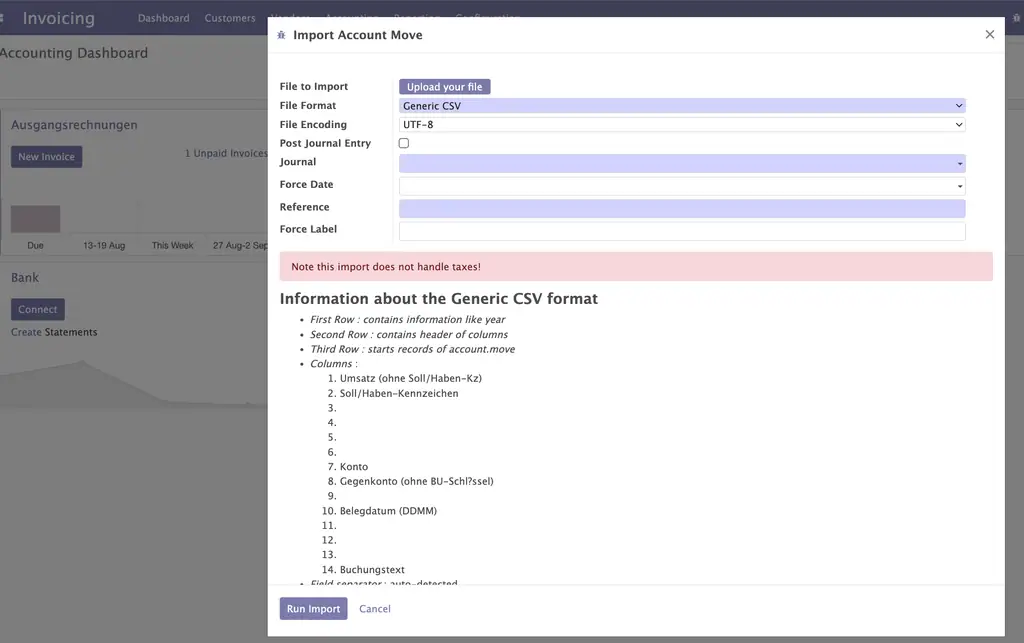
- Go to Accounting/Actions/DATEV Import
- Upload your DATEV format .csv file from your tax advisor
- Take care the file format is “DATEV Format .csv” (old version: Generic CSV)
- Take care your file encoding fits to the provided file (usually “Western (Windows-1252)”), if it is the original file from your tax advisor
- Optionally you may activate “Post Journal Entry” in order to immidiately confirm the created Journal Entry
- Select the mandatory journal (f.e. “Payroll Account Moves”), usually the journal type will be “Miscellaneous”
- Enter optionally the “Force Date” field ((will be the field “Date” in your Journal Entry)
- Enter the mandatory field “Reference” (will be the field “Reference” in your Journal Entry)
- Enter optionally the field “Force Label” (will be the field “Name” in your Journal Items)
- Finally click on “Run Import”
If everyting works fine, you should now see your created Journal Entry in draft (execept you activated “Post Journal Entry”)
Typical issue
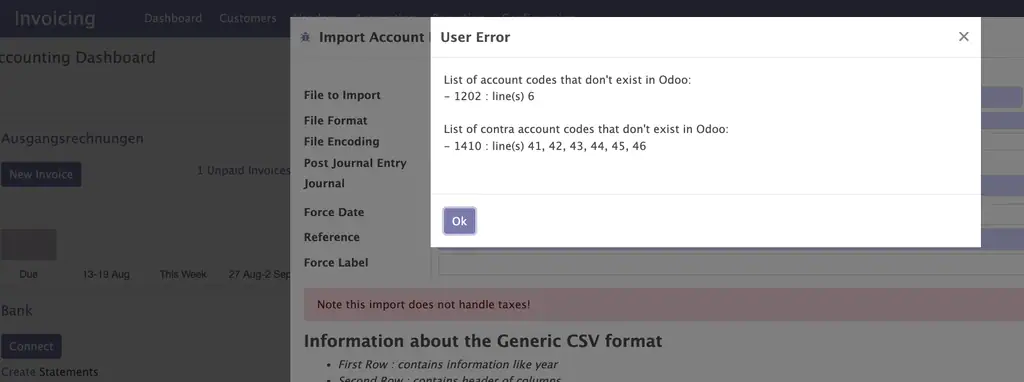
If accounts doesen’t exist in Odoo the wizard may interrupt and show you potential missing accounts.
In this case you have to ensure to create the missing accounts in Odoo.
Bug Tracker
Bugs are tracked on GitHub Issues. In case of trouble, please check there if your issue has already been reported. If you spotted it first, help us to smash it by providing a detailed and welcomed feedback.
Do not contact contributors directly about support or help with technical issues.
Credits
Contributors
- Holger Brunn <mail@hunki-enterprises.com> (https://hunki-enterprises.com)
Maintainers
This module is maintained by the OCA.
OCA, or the Odoo Community Association, is a nonprofit organization whose mission is to support the collaborative development of Odoo features and promote its widespread use.
This module is part of the OCA/l10n-germany project on GitHub.
You are welcome to contribute. To learn how please visit https://odoo-community.org/page/Contribute.
What this app does not do
The publisher has not yet published the list of what the app does not do. This is a store rule: ask support for it before you commit.
Store apps required
- Germany - Accounting
l10n_de
Odoo Community modules used
account
Python libraries
chardet
| Series | Version | Status | Published on |
|---|---|---|---|
| 19.0 | 19.0.2.0.0 | In development | 05/09/2026 |
Listing generated from julien2364/omnifloo-oca-l10n-germany (branch 19.0, commit 4a6c7177258f).
Automatic store check (separate from the publisher's), applied to all apps. Conforme.
| Check | Result | Effect if absent |
|---|---|---|
| Manifeste lisible sans exécution | conforme | bloquant |
| Licence reconnue (AGPL-3) | conforme | bloquant |
| Aucune dépendance vers Odoo Enterprise | conforme | bloquant |
| Aucun import de code Enterprise | conforme | bloquant |
| Aucun en-tête de licence Enterprise | conforme | bloquant |
| Icône static/description/icon.png | conforme | déclasse |
| Description (static/description/index.html ou README) | conforme | déclasse |
| Tests automatisés (tests/test_*.py) | conforme | déclasse |
| Traduction française (i18n/fr.po) | absent | info |
| Section « Ce que le module ne fait pas » | absent | info |
Reviews from signed-in customers. One rated review per customer; the publisher can reply. Sign in to leave a review.
- Publisher
- Odoo Community Association (OCA)
- Report a problem
- https://github.com/OCA/l10n-germany
- Omnifloo customers
- Support included with your plan: help centre.