
Authentication OpenID Connect
Allow users to login through OpenID Connect Provider
Schermafbeeldingen
-
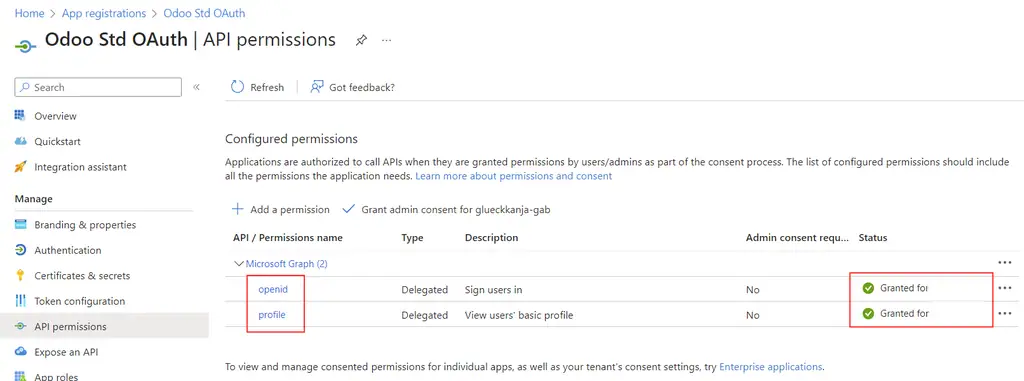
Authentication OpenID Connect — capture 1 -
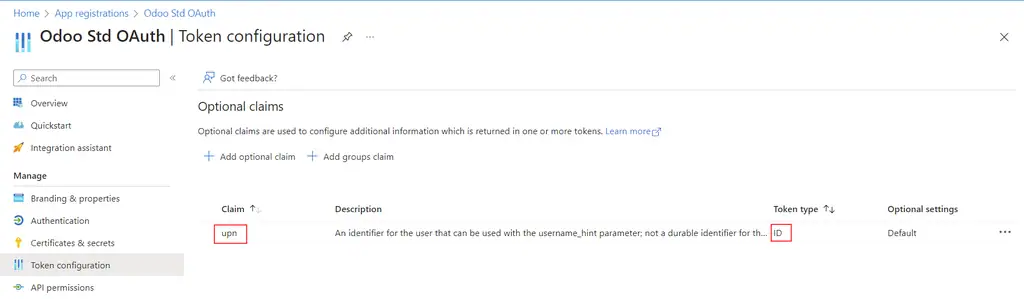
Authentication OpenID Connect — capture 2 -
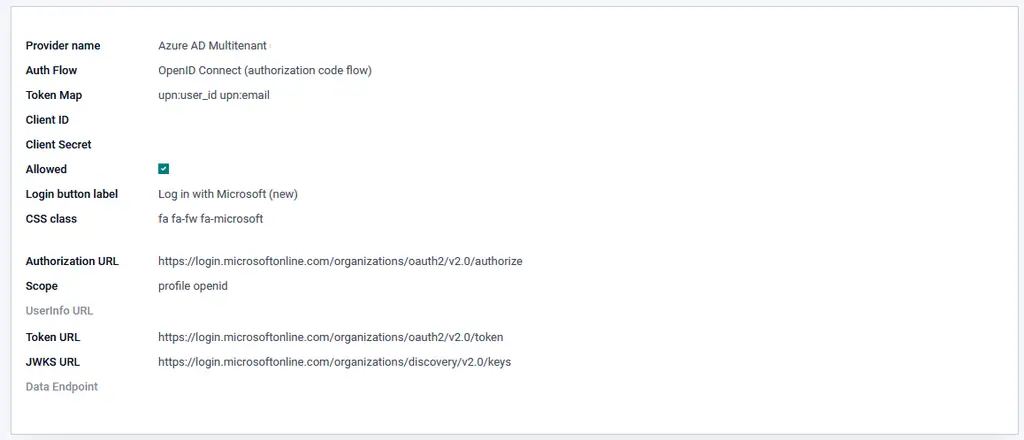
Authentication OpenID Connect — capture 3
Authentication OpenID Connect
This module allows users to login through an OpenID Connect provider using the authorization code flow or implicit flow.
Note the implicit flow is not recommended because it exposes access tokens to the browser and in http logs.
Table of contents
Installation
This module depends on the python-jose library, not to be confused with jose which is also available on PyPI.
Configuration
Setup for Microsoft Azure
Example configuration with OpenID Connect authorization code flow.
- configure a new web application in Azure with OpenID and code flow (see the provider documentation))
- in this application the redirect url must be be “<url of your server>/auth_oauth/signin” and of course this URL should be reachable from Azure
- create a new authentication provider in Odoo with the following parameters (see the portal documentation for more information):
Single tenant provider limits the access to user of your tenant, while Multitenants allow access for all AzureAD users, so user of foreign companies can use their AzureAD login without an guest account.
- Provider Name: Azure AD Single Tenant
- Client ID: Application (client) id
- Client Secret: Client secret
- Allowed: yes
or
- Provider Name: Azure AD Multitenant
- Client ID: Application (client) id
- Client Secret: Client secret
- Allowed: yes
- replace {tenant_id} in urls with your Azure tenant id
Setup for Keycloak
Example configuration with OpenID Connect authorization code flow.
In Keycloak:
- configure a new Client
- make sure Authorization Code Flow is Enabled.
- configure the client Access Type as “confidential” and take note of the client secret in the Credentials tab
- configure the redirect url to be “<url of your server>/auth_oauth/signin”
In Odoo, create a new Oauth Provider with the following parameters:
- Provider name: Keycloak (or any name you like that identify your keycloak provider)
- Auth Flow: OpenID Connect (authorization code flow)
- Client ID: the same Client ID you entered when configuring the client in Keycloak
- Client Secret: found in keycloak on the client Credentials tab
- Allowed: yes
- Body: the link text to appear on the login page, such as Login with Keycloak
- Scope: openid email
- Authentication URL: The “authorization_endpoint” URL found in the OpenID Endpoint Configuration of your Keycloak realm
- Token URL: The “token_endpoint” URL found in the OpenID Endpoint Configuration of your Keycloak realm
- JWKS URL: The “jwks_uri” URL found in the OpenID Endpoint Configuration of your Keycloak realm
Usage
On the login page, click on the authentication provider you configured.
Known issues / Roadmap
- When going to the login screen, check for a existing token and do a direct login without the clicking on the SSO link
- When doing a logout an extra option to also logout at the SSO provider.
Changelog
19.0.1.0.0 2025-10-01
- Odoo 19 migration
18.0.1.0.0 2024-10-09
- Odoo 18 migration
17.0.1.0.0 2024-03-20
- Odoo 17 migration
16.0.1.1.0 2024-02-28
- Forward port OpenID Connect fixes from 15.0 to 16.0
16.0.1.0.2 2023-11-16
- Readme link updates
16.0.1.0.1 2023-10-09
- Add AzureAD code flow provider
16.0.1.0.0 2023-01-27
- Odoo 16 migration
15.0.1.0.0 2023-01-06
- Odoo 15 migration
14.0.1.0.0 2021-12-10
- Odoo 14 migration
13.0.1.0.0 2020-04-10
- Odoo 13 migration, add authorization code flow.
10.0.1.0.0 2018-10-05
- Initial implementation
Bug Tracker
Bugs are tracked on GitHub Issues. In case of trouble, please check there if your issue has already been reported. If you spotted it first, help us to smash it by providing a detailed and welcomed feedback.
Do not contact contributors directly about support or help with technical issues.
Credits
Authors
- ICTSTUDIO
- André Schenkels
- ACSONE SA/NV
Contributors
- Alexandre Fayolle <alexandre.fayolle@camptocamp.com>
- Stéphane Bidoul <stephane.bidoul@acsone.eu>
- David Jaen <contact@omnifloo.com>
- Andreas Perhab <andreas.perhab@wt-io-it.at>
Maintainers
This module is maintained by the OCA.
OCA, or the Odoo Community Association, is a nonprofit organization whose mission is to support the collaborative development of Odoo features and promote its widespread use.
Current maintainer:
This module is part of the OCA/server-auth project on GitHub.
You are welcome to contribute. To learn how please visit https://odoo-community.org/page/Contribute.
Wat deze app niet doet
- When going to the login screen, check for a existing token and do a direct login without the clicking on the SSO link
- When doing a logout an extra option to also logout at the SSO provider.
Vereiste applicaties van de appstore
Geen.
Gebruikte Odoo Community-modules
auth_oauth
Python-bibliotheken
python-jose
| Serie | Versie | Status | Gepubliceerd op |
|---|---|---|---|
| 20.0 | 20.0.1.0.0 | Beschikbaar | 05-10-2026 |
Fiche gegenereerd uit de code van de uitgever (privé-repository, branch 20.0): de broncode is niet gepubliceerd.
Automatische controle van de appstore (los van de uitgever), toegepast op alle applicaties. Conforme.
| Controle | Resultaat | Effect indien afwezig |
|---|---|---|
| Manifeste lisible sans exécution | conforme | bloquant |
| Licence reconnue (AGPL-3) | conforme | bloquant |
| Aucune dépendance vers Odoo Enterprise | conforme | bloquant |
| Aucun import de code Enterprise | conforme | bloquant |
| Aucun en-tête de licence Enterprise | conforme | bloquant |
| Icône static/description/icon.png | conforme | déclasse |
| Description (static/description/index.html ou README) | conforme | déclasse |
| Tests automatisés (tests/test_*.py) | conforme | déclasse |
| Traduction française (i18n/fr.po) | absent | info |
| Section « Ce que le module ne fait pas » | conforme | info |
| Titre de 70 caractères au plus (29 actuellement) | conforme | info |
| Résumé en français | conforme | info |
Beoordelingen van ingelogde klanten. Eén beoordeling per klant; de uitgever kan erop reageren. Log in om een beoordeling te plaatsen.
- Uitgever
- Omnifloo (DYONYSOS)
- contact@omnifloo.com
- Omnifloo-klanten
- Support inbegrepen volgens uw formule: helpcentrum.