
Assets management for Odoo Community 20: asset types, depreciation boards, entries, pause, modification, sale or disposal, depreciation schedule
Schermafbeeldingen
-
Assets Management — capture 1 -
Assets Management — capture 2
Asset Management for Odoo 20 Community
Register what the company owns, depreciate it automatically on a board you can see and correct, and print the depreciation schedule your accountant asks for at the close.
Set a category up once, and every asset inherits it
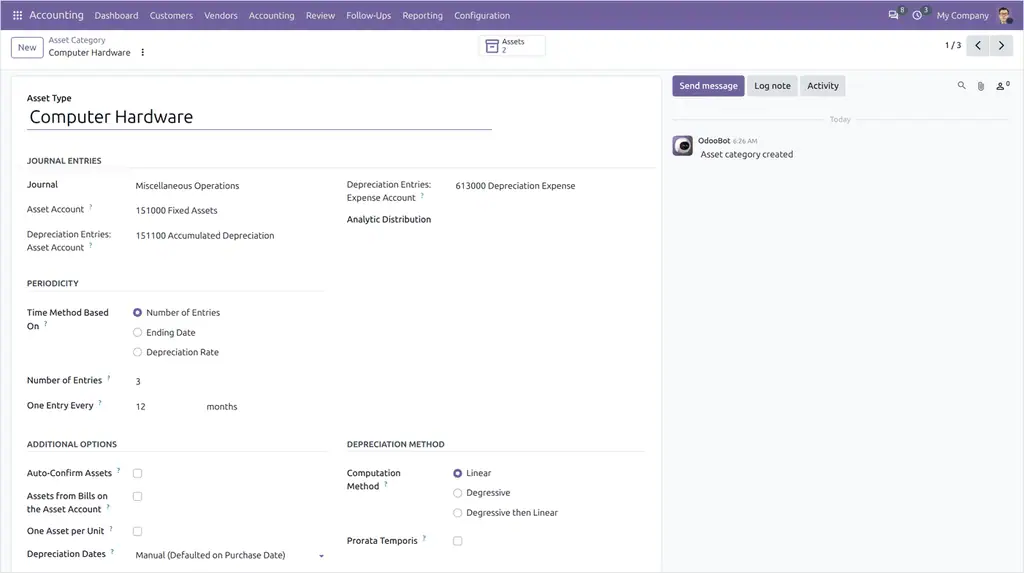
A category carries the accounts, the journal and the method, so creating an asset is a matter of a name, a value and a date.
- ✓ Asset account, depreciation account and expense account.
- ✓ Linear or degressive, with the number of depreciations and their period.
- ✓ Prorata temporis to start on the purchase date rather than the first of the period.
- ✓ Create the asset automatically from a vendor bill line carrying the category.
An asset category: the accounts, the journal and the method.
A board you can read, and correct
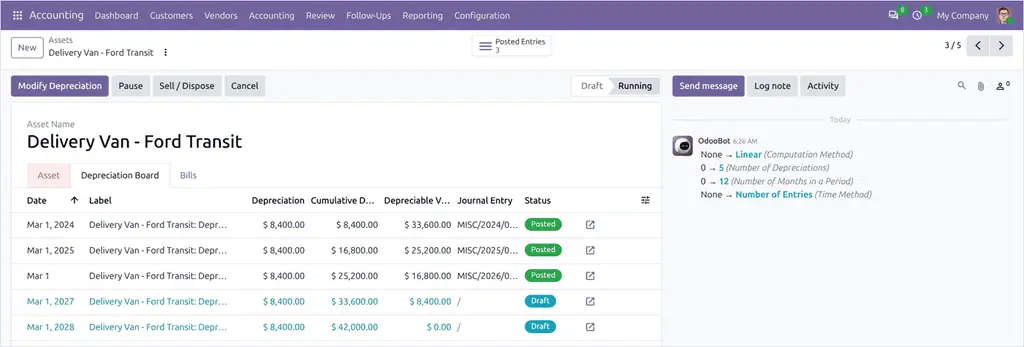
Each asset shows one line per period with its date, its amount and the value left. Nothing is hidden in a computation you cannot see.
- ✓ Confirm to put the asset in service; the entries are posted period by period.
- ✓ Modify the duration or the value and the remaining lines are recomputed.
- ✓ Sell or dispose of an asset and the remaining value is written off.
- ✓ Assets bought before you went live start from the depreciation already posted.
An asset with its depreciation board.
The schedule the auditor asks for
The Depreciation Schedule gives the gross value, the depreciation of the period and the closing values, category by category. Asset Analysis is the same data in pivot and graph.
- ✓ Gross value, accumulated depreciation and book value.
- ✓ By category, by journal or by period.
- ✓ Exported to a spreadsheet from the pivot.
Disponible sur omnifloo.com
Distribué par DYONYSOS sur le store Omnifloo (omnifloo.com), jamais sur l'Odoo Apps Store. Available on omnifloo.com.
Module libre sous licence LGPL-3, porté en 20.0 pour Omnifloo ; auteurs d'origine indiqués dans le manifeste et les fichiers sources. Free module (LGPL-3); original authors listed in the manifest and the source files.
Wat deze app niet doet
De uitgever heeft nog niet gepubliceerd wat de applicatie niet doet. Dat is een regel van de appstore: vraag het aan de support voordat u zich verbindt.
Vereiste applicaties van de appstore
Geen.
Gebruikte Odoo Community-modules
account
Applicaties die haar aanvullen
| Serie | Versie | Status | Gepubliceerd op |
|---|---|---|---|
| 20.0 | 20.0.2.0.5 | Beschikbaar | 06-10-2026 |
Fiche gegenereerd uit de code van de uitgever (privé-repository, branch 20.0): de broncode is niet gepubliceerd.
Automatische controle van de appstore (los van de uitgever), toegepast op alle applicaties. Conforme.
| Controle | Resultaat | Effect indien afwezig |
|---|---|---|
| Manifeste lisible sans exécution | conforme | bloquant |
| Licence reconnue (LGPL-3) | conforme | bloquant |
| Aucune dépendance vers Odoo Enterprise | conforme | bloquant |
| Aucun import de code Enterprise | conforme | bloquant |
| Aucun en-tête de licence Enterprise | conforme | bloquant |
| Icône static/description/icon.png | conforme | déclasse |
| Description (static/description/index.html ou README) | conforme | déclasse |
| Tests automatisés (tests/test_*.py) | conforme | déclasse |
| Traduction française (i18n/fr.po) | conforme | info |
| Section « Ce que le module ne fait pas » | absent | info |
| Titre de 70 caractères au plus (17 actuellement) | conforme | info |
| Résumé en français | absent | info |
Beoordelingen van ingelogde klanten. Eén beoordeling per klant; de uitgever kan erop reageren. Log in om een beoordeling te plaatsen.
- Uitgever
- Omnifloo (DYONYSOS)
- contact@omnifloo.com
- Omnifloo-klanten
- Support inbegrepen volgens uw formule: helpcentrum.