
MuK Backend Theme
muk_web_theme
Odoo Community Backend Theme
The backend your team looks at all day, redesigned.
Every app in a bar down the side, an apps menu over a background of your own, and your brand colours set from the settings — not forked into the source.
Every app the user may open sits in a bar down the side, in the order they arranged them, one click from anywhere.
Brand colours, the apps-menu background and the favicon are company settings, so an upgrade has nothing to merge.
The app bar, the colours, the chatter, the dialogs, the group controls and the refresh button all arrive together.

A bundle, not a skin
The look is the visible part. Installing it also brings five modules that change how the backend is used, each of them a listing of its own.
Apps down the side at every width, and a full-window menu over a background image set per company.
Brand, primary and the context colours, plus the bar's own palette, written to an asset and reset in one click.
The history moves to the side, so the form keeps its full width. Each user chooses where it sits.
A control in every dialog header, and a preference for the size dialogs open at.
Open a whole grouped tree, at every level, or fold it back, from the cog menu of any list or kanban.
A button beside the pager reloads the view in place, and a double-click keeps it current on a timer.

Settings, not source
Pick the colours and the backend follows, everywhere. The values are written into a customized asset, so nothing in the module is edited and an upgrade has nothing to merge. One button puts every colour back.
The background and the favicon follow the company. The sidebar width, the chatter position and the dialog size are each user's own.

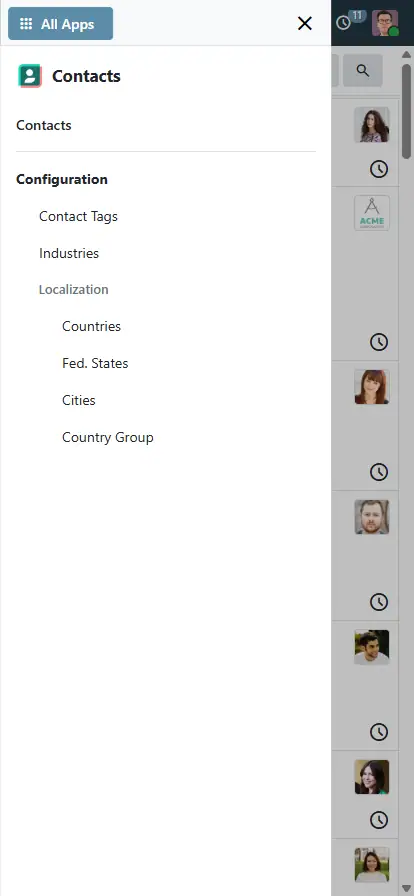
On a phone
The same backend, down to 390px.



Help and support
What you get for free, and what has to be paid work.
Issues and merge requests are welcome on the public repository. They are read — but no response time is promised.
A theme built to your brand, or a fix on a deadline, is paid work — quoted up front. Write to sale@mukit.at.
LGPL-3. Use it, change it, ship it inside your own work — no licence key, no database count.
Want more?
MuK IT — Austrian Odoo partner, ViennaModules written for your process, on your Odoo version.
Odoo joined up with the systems you already run.
Hosting, deployment and upgrades you do not have to watch.
Your team taught the parts of Odoo they actually use.
An agreement, so an answer does not depend on who is free.
Documentation
The full text is on the Documentation tab, and in doc/ inside the download.Odoo.sh or on-premise. Community only — it cannot be installed beside Odoo Enterprise.
None to start. The colours, background and favicon are under Settings › General Settings.
Pulls in the app bar, colours, chatter, dialog, group and refresh modules. Nothing external.
Install it and the backend changes. Each user sets their sidebar, chatter and dialog size in Preferences.
Colours live in a customized asset, not in the source, so there is nothing to merge.
MuK IT GmbH, Vienna. Author and maintainer.
Want it in your own brand?
Send us your palette and the screens your teams live in, and we will tell you what the settings already cover and what wants building. MuK IT — Austrian Odoo partner, Vienna.

Ce que l'application ne fait pas
L'éditeur n'a pas encore publié la liste de ce que l'application ne fait pas. C'est une règle du magasin : demandez-la au support avant de vous engager.
Applications du magasin nécessaires
- MuK AppsBar
muk_web_appsbar - MuK Chatter
muk_web_chatter - MuK Colors
muk_web_colors - MuK Dialog
muk_web_dialog - MuK Groups
muk_web_group - MuK Refresh
muk_web_refresh
Modules Odoo Community utilisés
Aucun.
| Série | Version | État | Publiée le |
|---|---|---|---|
| 20.0 | 20.0.1.4.19 | Disponible | 27/09/2026 |
Fiche générée depuis julien2364/omnifloo-tiers-muk-it-odoo-modules (branche 20.0, commit 5bd298c18a48).
Contrôle automatique du magasin (distinct de l'éditeur), appliqué à toutes les applications. Conforme.
| Contrôle | Résultat | Effet si absent |
|---|---|---|
| Manifeste lisible sans exécution | conforme | bloquant |
| Licence reconnue (LGPL-3) | conforme | bloquant |
| Aucune dépendance vers Odoo Enterprise | conforme | bloquant |
| Aucun import de code Enterprise | conforme | bloquant |
| Aucun en-tête de licence Enterprise | conforme | bloquant |
| Icône static/description/icon.png | conforme | déclasse |
| Description (static/description/index.html ou README) | conforme | déclasse |
| Tests automatisés (tests/test_*.py) | conforme | déclasse |
| Traduction française (i18n/fr.po) | conforme | info |
| Section « Ce que le module ne fait pas » | absent | info |
Avis des clients connectés. Un avis noté par client ; l'éditeur peut y répondre. Connectez-vous pour laisser un avis.
- Éditeur
- MuK IT GmbH
- Signaler un problème
- https://github.com/muk-it/odoo-modules
- Clients Omnifloo
- Support inclus selon votre formule : centre d'aide.